Anthropic Academy Courses My Profile Sign Out

Создание первого управляемого агента

Если вы уже создавали цикл агента вручную, то знаете, как это работает: циклы `while`, переключатели условий завершения, вызовы инструментов. Это работает, и для многих функций это действительно правильный подход. Но иногда такой цикл может выполняться очень долго — минуты, а то и часы — с использованием множества инструментов, сохранением состояния, записью файлов и необходимостью возобновления работы после сетевых сбоев. В этот момент вы не захотите запускать цикл на своём сервере. Вы захотите делегировать его. Именно для этого и предназначены управляемые агенты.

Что такое управляемый агент?

Управляемый агент — это цикл агента, который выполняется на инфраструктуре Anthropic, а не на вашей. Вы один раз описываете агента, задаёте ему среду для работы и запускаете сессию. Anthropic управляет циклом, а вы просто получаете поток событий по мере его работы.

Управляемые агенты включены по умолчанию для каждой учётной записи API — специального доступа не требуется.

Четыре примитива

Существует четыре примитива, и они следуют в определённом порядке:

  • Агент — это персона: модель, системное приглашение и набор инструментов. Его можно использовать многократно в разных запусках.
  • Среда — где выполняется агент: облако или локальная среда, сетевые настройки и так далее.
  • Сессия — это однократный запуск агента внутри определённой среды. Сессия является единицей работы.
  • События — это сообщения, которые поступают и исходят: действия агента, вызовы инструментов, результаты, ответы.

Вот как эти компоненты взаимодействуют: ваше приложение общается с сессией, сессия управляет работой внутри среды, а всё, что происходит, возвращается через поток событий:

Обратите внимание на смену парадигмы: вы не запускаете цикл `while`. Вы отправляете события и считываете события.

Самый простой управляемый агент

Давайте создадим самый простой управляемый агент, который выполняет полезную задачу: создаёт файл во временном хранилище, подсчитывает количество строк в нём и возвращает результат.

В качестве инструментов мы будем использовать набор инструментов агента — встроенные файловые, bash и веб-инструменты Anthropic. Они отлично подходят для этой задачи, поэтому нам не нужно определять инструменты самостоятельно.

Шаг 1: Создание агента

Сначала создадим агента. Обратите внимание на набор инструментов агента, определённый прямо в массиве `tools` — это встроенный набор:

```python

import anthropic

client = anthropic.Anthropic()

agent = client.beta.agents.create(

name="Line Counter",

model="claude-opus-4-8",

system="You are a helpful agent that completes small file tasks.",

tools=[

],

)

```

Помните: агент можно использовать многократно. Создайте его один раз и запускайте в разных сессиях.

Шаг 2: Создание среды

Далее создаём среду. Это запускает шаблон контейнера — облачный, с неограниченными сетевыми возможностями. Это песочница, где фактически создаётся файл:

```python

environment = client.beta.environments.create(

name="line-counter-env",

config={

"type": "cloud",

},

)

```

Шаг 3: Создание сессии

Затем создаём сессию с нашим агентом и средой, а также с необязательным заголовком. Сессия — это единица работы:

```python

session = client.beta.sessions.create(

agent=agent.id,

environment_id=environment.id,

title="Count lines demo",

)

```

Шаг 4: Открытие потока и отправка запускающего сообщения

Теперь открываем поток событий — и обратите внимание, что делаем это в первую очередь. Поток передаёт только те события, которые происходят после его открытия, поэтому всегда открывайте его перед отправкой запускающего сообщения. Затем отправляем пользовательское сообщение в живой поток:

```python

with client.beta.sessions.events.stream(session_id=session.id) as stream:

Поток открыт — теперь отправляем запускающее сообщение

client.beta.sessions.events.send(

session_id=session.id,

events=[

{

"type": "user.message",

"content": [

{

"type": "text",

"text": "Create a file in the temp directory, "

"count its lines, and report back.",

}

],

}

],

)

```

Обратите внимание, что используется множественное число — "events" (события). События — это то, как осуществляется обмен в этом API.

Шаг 5: Обработка потока

Наконец, обрабатываем поток. Для этой демонстрации важны три типа событий:

  • `agent.message` — текст от Claude
  • `agent.tool_use` — какой инструмент выбрал Claude
  • `session.status_idle` — агент завершил работу

```python

for event in stream:

if event.type == "agent.message":

for block in event.content:

if block.type == "text":

print(block.text, end="", flush=True)

elif event.type == "agent.tool_use":

elif event.type == "session.status_idle":

print(" --- Agent done ---")

break

```

Запустите код, и в результате вы получите рассуждения агента вслух — реальный текст, выбранные инструменты и окончательный ответ. Всё это выполняется внутри контейнера Anthropic, а не на вашем сервере.

Компромисс

Обычно с агентами мы используем собственный цикл, где контролируем всё самостоятельно. С управляемыми агентами вы делегируете этот цикл, песочницу и возможность возобновления — и просто потребляете поток событий по мере его поступления.

В производственном приложении такая структура подходит для долго выполняющихся задач, связанных с работой с файлами, например: «организуй это за меня». Представьте очистку файлового хранилища: управляемый агент считывает спецификацию структуры целевой директории, обходит запутанную входящую папку, перемещает файлы в нужные проектные папки, архивирует дубликаты и «пустые» файлы, а также помечает всё, что не может уверенно распределить — всё это выполняется в рамках сессии, которая может длиться минуты при работе с тысячами файлов. Вот как это выглядит в реальном приложении — панель очистки файлового хранилища, которая транслирует активность агента в реальном времени, пока он сортирует, архивирует и помечает файлы:

Итоги

  • Управляемые агенты — это цикл агента, который выполняется за вас — на инфраструктуре Anthropic, а не на вашем сервере.
  • Рабочий процесс выглядит так: создать агента, создать среду, создать сессию, отправлять события и получать поток событий.
  • Агент (модель, системное приглашение, набор инструментов) можно использовать многократно; сессия — это однократный запуск; события — это то, как осуществляется обмен.
  • Открывайте поток событий перед отправкой запускающего сообщения — он передаёт только те события, которые происходят после его открытия.
  • Следите за тремя типами событий: `agent.message` (текст), `agent.tool_use` (выбор инструментов) и `session.status_idle` (завершение).
  • Используйте управляемых агентов, когда цикл должен выполняться слишком долго, делать слишком много или должен пережить сбой. Используйте ручной цикл, если вам нужно полное управление.

If you've built an agent loop by hand, you know the drill: while loops, stop reason switches, tool executions. That works, and for a lot of features it's actually the right shape. But sometimes that loop is going to run for a very long time — minutes, maybe even hours — across many tools, with state to keep, files to write, and work to resume after a network hiccup. At that point, you don't want to run the loop on your server. You want to delegate it. That's what managed agents are.

What is a managed agent?

A managed agent is an agent loop that runs on Anthropic's infrastructure instead of yours. You describe the agent once, you give it an environment to work in, and you start a session. Anthropic runs the loop, and you just stream the events back out as it works.

Managed agents are enabled by default for every API account — no special access needed.

The four primitives

There are four primitives, and they come in order:

  1. Agent — the persona: model, system prompt, and toolset. This is reusable across many runs.
  2. Environment — where the agent runs: cloud or local, networking config, and so on.
  3. Session — a single run of an agent inside a certain environment. The session is the unit of work.
  4. Events — the messages flowing in and out: the agent's actions, the tool calls, the results, the replies.

Here's how the pieces fit together: your app talks to a session, the session drives work inside the environment, and everything that happens flows back out through the event stream:
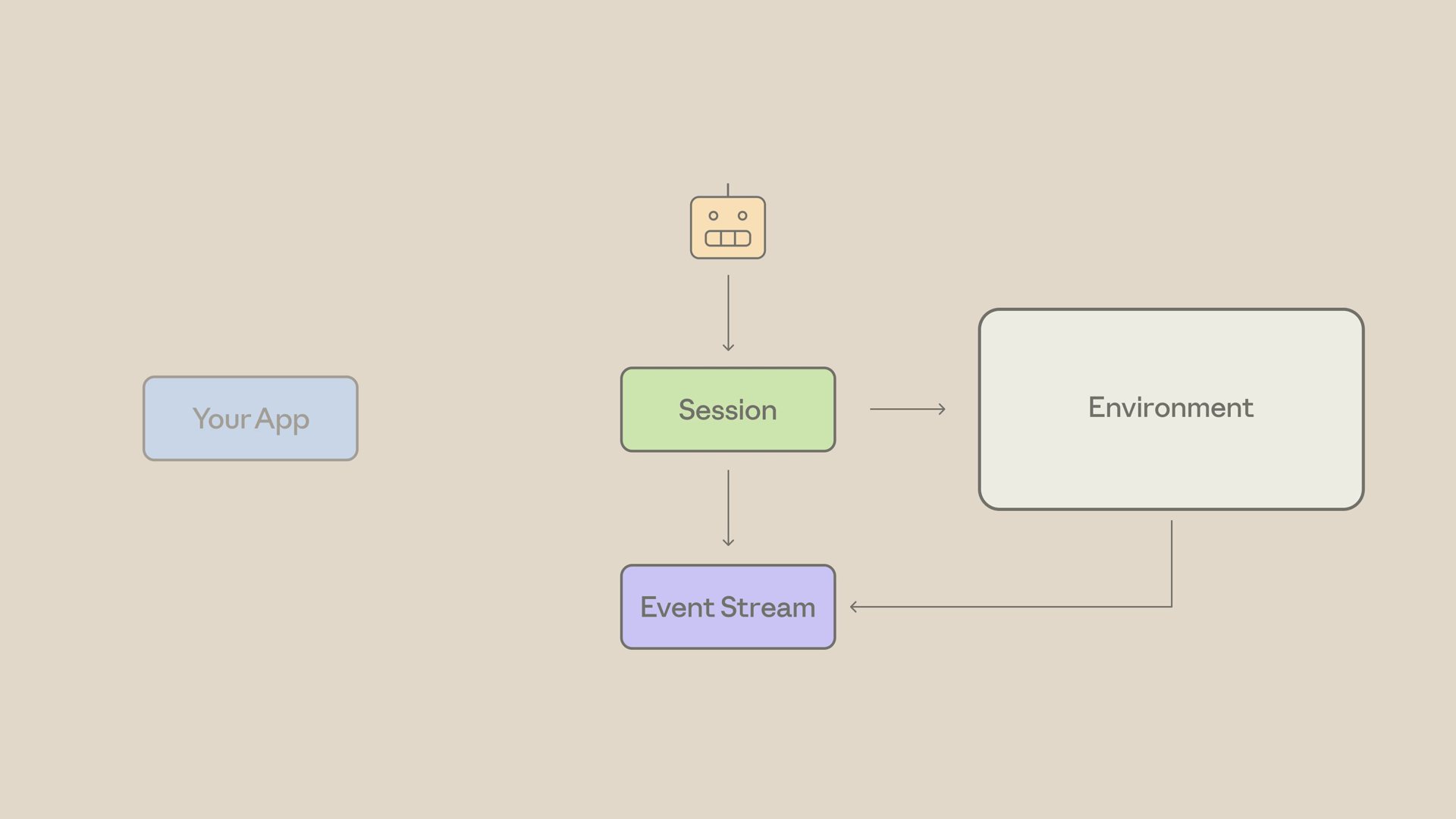
Architecture diagram showing an agent connected to a Session, which drives an Environment, with results flowing back through an Event Stream to your app

Notice the shift here: you're not running a while loop. You're sending events and reading events.

The smallest possible managed agent

Let's build the smallest managed agent that does something useful: create a file in the temp drive, count its lines, and report back.

For tools, we'll use the agent toolset — Anthropic's bundled file, bash, and web tools. They work fine for this task, so we don't have to define any tools ourselves.

Step 1: Create the agent

First, we create the agent. Note the agent toolset defined right in the tools array — that's the bundled toolset:

import anthropic

client = anthropic.Anthropic()

agent = client.beta.agents.create(
    name="Line Counter",
    model="claude-opus-4-8",
    system="You are a helpful agent that completes small file tasks.",
    tools=[
        {"type": "agent_toolset_20260401", "default_config": {"enabled": True}}
    ],
)

Remember: the agent is reusable. Create it once and run it across many sessions.

Step 2: Create the environment

Next, the environment. This spins up the container template — cloud, with unrestricted networking. This is the sandbox where the file actually gets written:

environment = client.beta.environments.create(
    name="line-counter-env",
    config={
        "type": "cloud",
        "networking": {"type": "unrestricted"},
    },
)

Step 3: Create the session

Then we create a session with our agent and environment, plus an optional title. The session is the unit of work:

session = client.beta.sessions.create(
    agent=agent.id,
    environment_id=environment.id,
    title="Count lines demo",
)

Step 4: Open the stream, then send the kickoff

Now we open the event stream — and notice that we do this first. The stream only delivers events that occur after it opens, so always open it before sending the kickoff message. Then we send the user message into the live stream:

with client.beta.sessions.events.stream(session_id=session.id) as stream:
    # Stream is open — now send the kickoff
    client.beta.sessions.events.send(
        session_id=session.id,
        events=[
            {
                "type": "user.message",
                "content": [
                    {
                        "type": "text",
                        "text": "Create a file in the temp directory, "
                                "count its lines, and report back.",
                    }
                ],
            }
        ],
    )

Notice it's events — plural. Events are how everything flows in this API.

Step 5: Consume the stream

Finally, we consume the stream. There are three event types that matter for this demo:

  • agent.message — Claude's text
  • agent.tool_use — what tool Claude picked
  • session.status_idle — the agent is done
    for event in stream:
        if event.type == "agent.message":
            for block in event.content:
                if block.type == "text":
                    print(block.text, end="", flush=True)
        elif event.type == "agent.tool_use":
            print(f"\n[tool] {event.name}")
        elif event.type == "session.status_idle":
            print("\n--- Agent done ---")
            break

Run it, and the output is the agent reasoning out loud — actual text, the tools it picks, and a final answer. All of it running inside Anthropic's container, not yours:
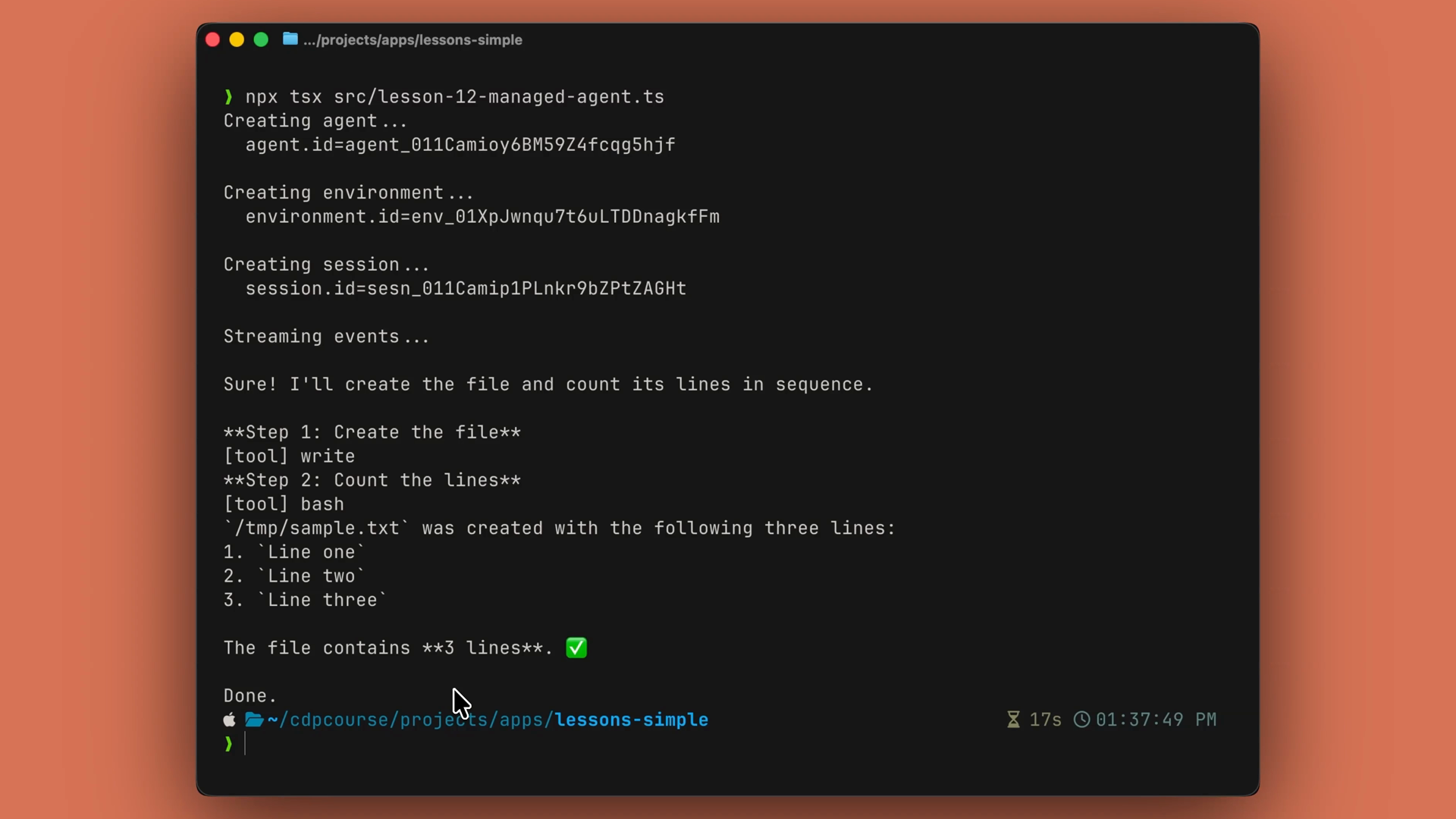
Terminal output of the managed agent run: agent, environment, and session IDs are created, then the event stream shows the agent writing the file, running its tools, and reporting that the file contains 3 lines

The trade

Usually with agents, we have our own loop where we have to control everything. With managed agents, you delegate that loop, the sandbox, and the resumability — and just consume the event stream as it comes in.

In a production app, this is the shape for long-running, file-touching, "go organize this for me" tasks. Picture a file share cleanup: a managed agent reads a target directory structure spec, walks the messy incoming folder, moves files into the right project folders, archives duplicates and zero-byte garbage, and flags anything it can't confidently place — all in a session that can run for minutes against thousands of files. Here's what that looks like in a real app — a fileshare cleanup dashboard streaming the agent's activity live as it sorts, archives, and flags files:
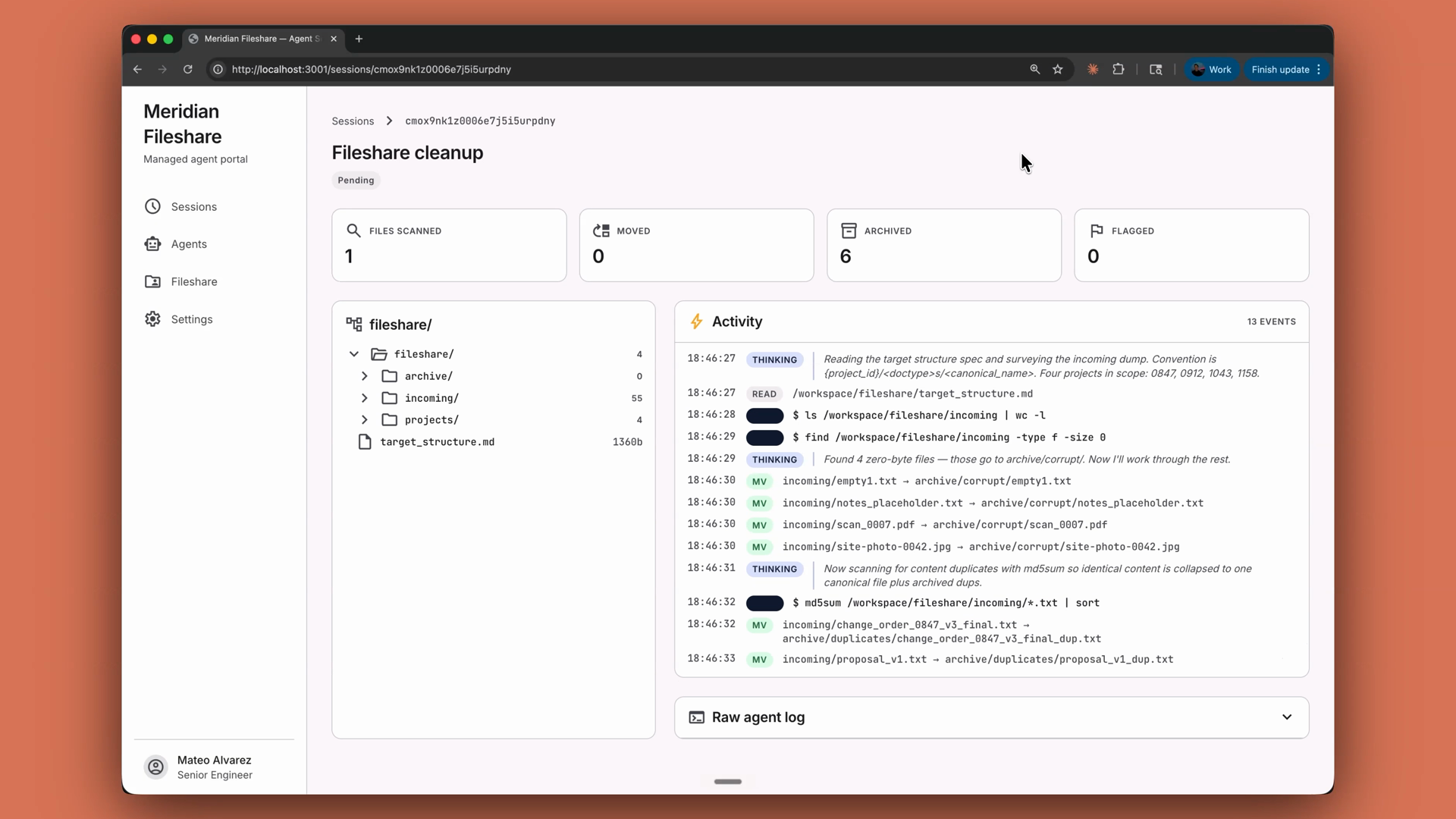
A fileshare cleanup web app powered by a managed agent, showing the folder tree being organized alongside a live activity feed of the agent's events as it moves and archives files

Recap

  • Managed agents are the agent loop, run for you — on Anthropic's infrastructure instead of your server.
  • The flow is: create an agent, create an environment, create a session, send events in, and stream events out.
  • The agent (model, system prompt, toolset) is reusable across runs; the session is a single run; events are how everything flows.
  • Open the event stream before sending your kickoff message — it only delivers events that occur after it opens.
  • Watch for three events: agent.message (text), agent.tool_use (tool picks), and session.status_idle (done).
  • Reach for managed agents when the loop would run too long, do too much, or need to survive a hiccup. Reach for a manual loop when you want full control.