Anthropic Academy Courses My Profile Sign Out

Объяснение цикла агента

Вы уже делали API-запросы, но один вызов возвращает только один ответ. Если вы хотите автоматизировать рабочий процесс, Claude должен действовать, анализировать результат, принимать решение о следующем шаге и продолжать. Именно этот шаблон имеют в виду, когда говорят об агентных рабочих процессах.

Что такое агент

Агент — это автономная версия Claude, которая выполняет обе стороны цикла обмена сообщениями без участия человека. Агент получает задачу, выбирает инструмент и выполняет код в цикле, пока Claude не решит, что задача выполнена.

Самый простой способ реализовать цикл агента выглядит так:

  • Отправьте сообщение Claude с доступными инструментами.
  • Claude отвечает либо окончательным ответом, либо запросом на использование инструмента, который вы определили.
  • Ваш код выполняет этот инструмент.
  • Вы отправляете результат обратно Claude.
  • Повторяйте, пока причина остановки не станет `end_turn`.

Представьте это как диалог, в котором ходы чередуются: пользователь начинает, агент вызывает инструмент, инструмент возвращает результат, и агент продолжает, пока не получит ответ.

Минимальный работающий пример

Чтобы увидеть, как этот цикл работает от начала до конца без подключения базы данных или интерфейса, мы подключим фиктивный инструмент `get_weather` и спросим у Claude, что надеть в Остине сегодня. У Claude нет возможности узнать погоду самостоятельно, поэтому ему придется вызвать инструмент, прочитать результат и затем дать вам ответ.

Вот весь скрипт:

```python

import anthropic

client = anthropic.Anthropic()

Массив tools сообщает Claude, какие инструменты доступны:

имя, описание и JSON-схема для входных данных.

tools = [

{

"name": "get_weather",

"description": "Get the current weather for a city.",

"input_schema": {

"type": "object",

"properties": {

"city": {

"type": "string",

"description": "The city to get weather for",

}

},

"required": ["city"],

},

}

]

run_tool — это просто жестко зашитый поиск.

В реальном приложении это обращение к вашей базе данных, API и т. д.

def run_tool(name, tool_input):

if name == "get_weather":

return "It's 72°F and sunny in Austin."

messages = [

{

"role": "user",

"content": "What should I wear in Austin today?"

}

]

Цикл агента. На каждой итерации отправляем сообщения Claude

и переключаемся в зависимости от причины остановки ответа.

while True:

response = client.messages.create(

model="claude-sonnet-4-6",

max_tokens=1024,

tools=tools,

messages=messages,

)

if response.stop_reason == "end_turn":

Claude завершил работу. Выводим окончательный текст и прерываем цикл.

for block in response.content:

if block.type == "text":

print(block.text)

break

if response.stop_reason == "tool_use":

Находим блоки использования инструментов в ответе и выполняем каждый из них.

tool_results = []

for block in response.content:

if block.type == "tool_use":

result = run_tool(block.name, block.input)

tool_results.append(

{

"type": "tool_result",

"tool_use_id": block.id,

"content": result,

}

)

Добавляем ответ ассистента и наши результаты инструментов

обратно в messages, затем снова запускаем цикл, чтобы Claude мог ответить.

messages.append({"role": "assistant", "content": response.content})

messages.append({"role": "user", "content": tool_results})

```

Три ключевых момента:

  • Массив `tools` сообщает Claude, какие инструменты доступны: имя, описание и JSON-схема для входных данных.
  • `run_tool` — это просто жестко зашитый поиск. В реальном приложении это обращение к вашей базе данных, API и т. д.
  • Цикл — это цикл агента. На каждой итерации отправляем сообщения Claude и переключаемся в зависимости от причины остановки ответа. При `end_turn` Claude завершил работу — выводим окончательный текст и прерываем цикл. При `tool_use` находим блоки использования инструментов, выполняем каждый из них, добавляем ответ ассистента и наши результаты инструментов обратно в `messages` и снова запускаем цикл, чтобы Claude мог ответить.

Запуск

При запуске скрипта вы увидите два хода:

  • Первый ход: причина остановки — `tool_use`. Claude запрашивает `get_weather` для Остина, и ваш код возвращает температуру и условия.
  • Второй ход: причина остановки — `end_turn`, и Claude советует надеть что-то легкое и дышащее.

Два API-вызова, одно выполнение инструмента, один окончательный ответ. Это весь цикл. Любая разработка с использованием API Claude будет похожа на этот пример.

Тот же цикл в производственной среде

В реальной среде тот же цикл используется, например, для конечной точки автоматического ревью: агент соответствия, который считывает структурный отчет, ищет соответствующие строительные нормы и правила с помощью инструмента и записывает результаты оценки риска в базу данных по одному по мере работы.

Структура цикла идентична тому, что вы только что запустили. Различия заключаются в следующем:

  • Реальные инструменты вместо фиктивного поиска погоды.
  • Результаты потоком возвращаются в интерфейс в виде событий, отправляемых сервером.
  • Результаты сохраняются в таблице findings риска.

Итоги

  • Агент — это Claude в цикле: наблюдение, принятие решения, действие, повторение.
  • Цикл простой: отправляйте сообщения с инструментами, выполняйте любые инструменты, которые запросит Claude, передавайте результат обратно и останавливайтесь, когда причина остановки — `end_turn`.
  • Вы отвечаете за цикл и инструменты. Claude отвечает за рассуждения.
  • Та же структура цикла масштабируется от демонстрации с фиктивной погодой до производственного агента соответствия — меняются только инструменты и инфраструктура.
  • Если вы не хотите управлять циклом самостоятельно, управляемые агенты выполняют этот же цикл за вас на инфраструктуре Anthropic.

You've made API calls, but a single call only returns one response. If you want to automate a workflow, Claude needs to act, look at the result, decide what's next, and keep going. That pattern is what people mean when they talk about agentic workflows.

What an agent actually is

An agent is an autonomous version of Claude, running both sides of the messaging loop without a human in the middle. An agent receives a task, picks a tool, and executes code in a loop until Claude decides the task is done.

The easiest way to implement an agent loop looks like this:

  1. Send a message to Claude with tools available.
  2. Claude responds with either a final answer or a request to use a tool you defined.
  3. Your code executes that tool.
  4. You send the result back to Claude.
  5. Repeat until the stop reason is end_turn.

Think of it as a conversation where the turns alternate: the user kicks things off, the agent calls a tool, the tool returns a result, and the agent keeps going until it has an answer.

A minimal working example

To see this loop run end to end without dragging in a database or a UI, we'll wire up a fake tool called get_weather and ask Claude what to wear in Austin today. Claude has no way to know the weather on its own, so it has to call the tool, read the result, and then give you an answer.

Here's the whole script:

import anthropic

client = anthropic.Anthropic()

# The tools array tells Claude what's available:
# a name, a description, and a JSON schema for the inputs.
tools = [
    {
        "name": "get_weather",
        "description": "Get the current weather for a city.",
        "input_schema": {
            "type": "object",
            "properties": {
                "city": {
                    "type": "string",
                    "description": "The city to get weather for",
                }
            },
            "required": ["city"],
        },
    }
]

# run_tool is just a hardcoded lookup.
# In a real app, this would hit your database, an API, whatever.
def run_tool(name, tool_input):
    if name == "get_weather":
        return f"Weather in {tool_input['city']}: 95F, sunny"
    raise ValueError(f"Unknown tool: {name}")

messages = [
    {"role": "user", "content": "What should I wear in Austin today?"}
]

# The agent loop. Each iteration sends messages to Claude
# and switches on the response's stop reason.
while True:
    response = client.messages.create(
        model="claude-sonnet-4-6",
        max_tokens=1024,
        tools=tools,
        messages=messages,
    )

    if response.stop_reason == "end_turn":
        # Claude is done. Print the final text and break.
        for block in response.content:
            if block.type == "text":
                print(block.text)
        break

    if response.stop_reason == "tool_use":
        # Find the tool use blocks in the response and run each one.
        tool_results = []
        for block in response.content:
            if block.type == "tool_use":
                result = run_tool(block.name, block.input)
                tool_results.append(
                    {
                        "type": "tool_result",
                        "tool_use_id": block.id,
                        "content": result,
                    }
                )

        # Push the assistant's response and our tool results
        # back into messages, then loop again so Claude can answer.
        messages.append({"role": "assistant", "content": response.content})
        messages.append({"role": "user", "content": tool_results})

Three pieces to notice:

  • The tools array tells Claude what's available: a name, a description, and a JSON schema for the inputs.
  • run_tool is just a hardcoded lookup. In a real app, this would hit your database, an API, whatever.
  • The loop is the agent loop. Each iteration sends the messages to Claude and switches on the response's stop reason. On end_turn, Claude is done — print the final text and break. On tool_use, find the tool use blocks, run each one, push the assistant's response and your tool results back into messages, and loop again so Claude can answer.

Running it

When you run the script, you'll see two turns:

  1. Turn one: the stop reason is tool_use. Claude requests get_weather for Austin, and your code returns the temperature and conditions.
  2. Turn two: the stop reason is end_turn, and Claude tells you to wear something light and breathable.
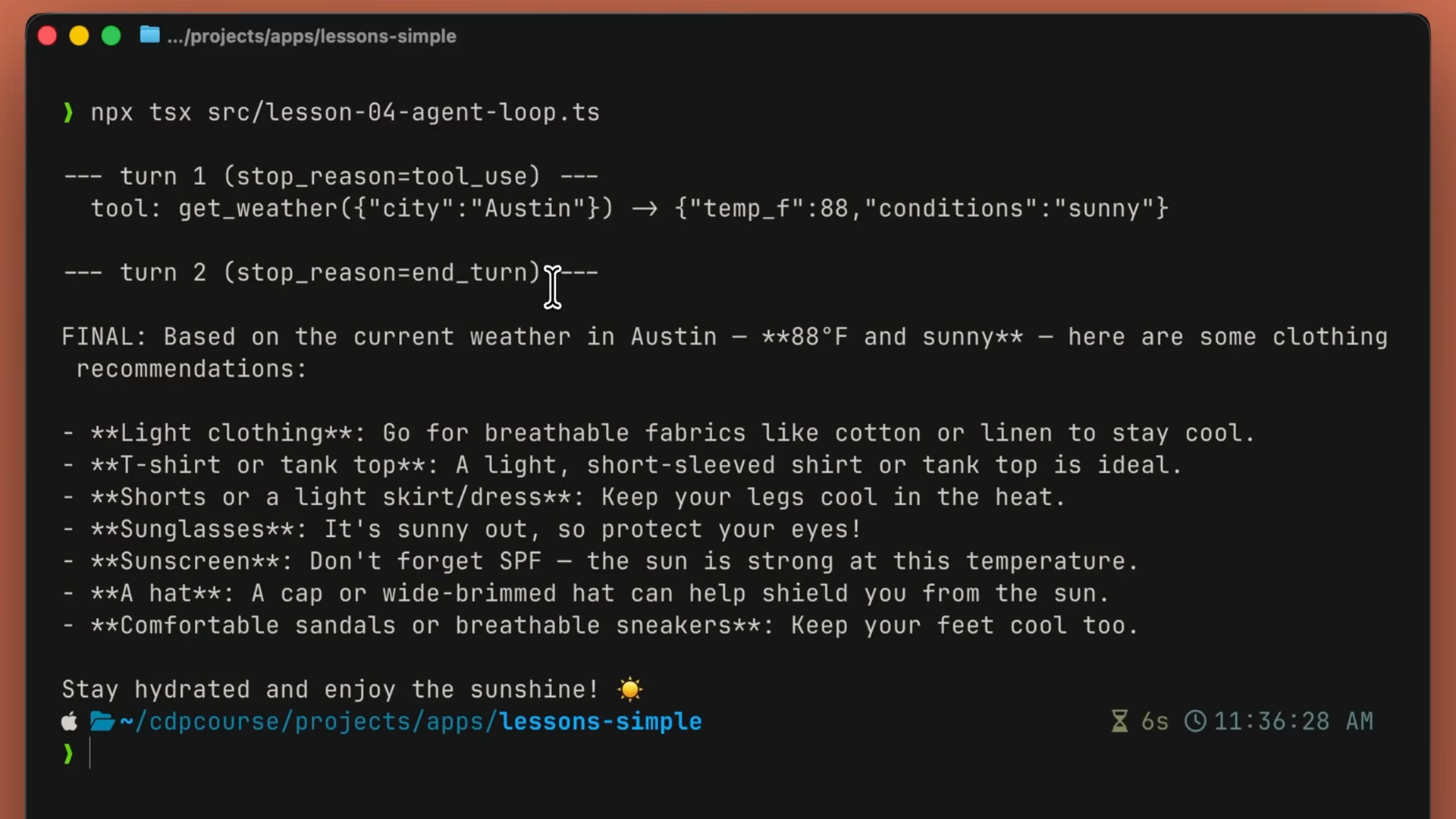
Terminal output of the agent loop: turn 1 stops with tool_use and calls get_weather for Austin, then turn 2 stops with end_turn and Claude prints its final clothing recommendations

Two API calls, one tool execution, one final answer. That's the entire loop. Everything you build with the Claude API is going to be similar to this.

The same loop in production

In a real environment, this same loop powers something like an auto-review endpoint: a compliance agent that reads a structural report, looks up the relevant building codes via a tool, and writes risk findings back to the database one by one as it works.
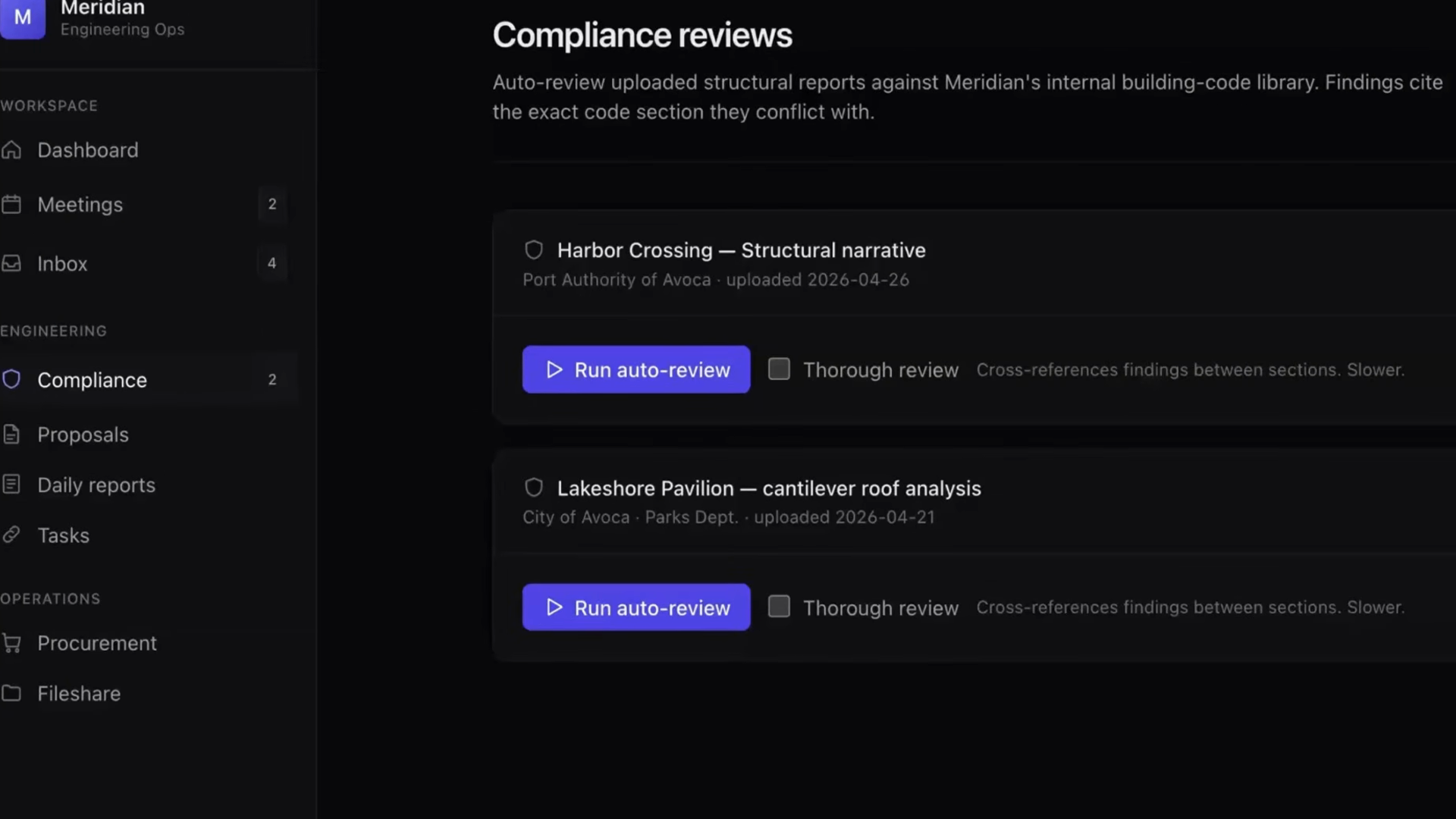
A compliance review dashboard listing uploaded structural reports, each with a Run auto-review button that kicks off the agent

The shape of the loop is identical to what you just ran. The differences are:

  • Real tools instead of a mock weather lookup.
  • Results stream back to the UI as server-sent events.
  • Findings get persisted to a risk-finding table.
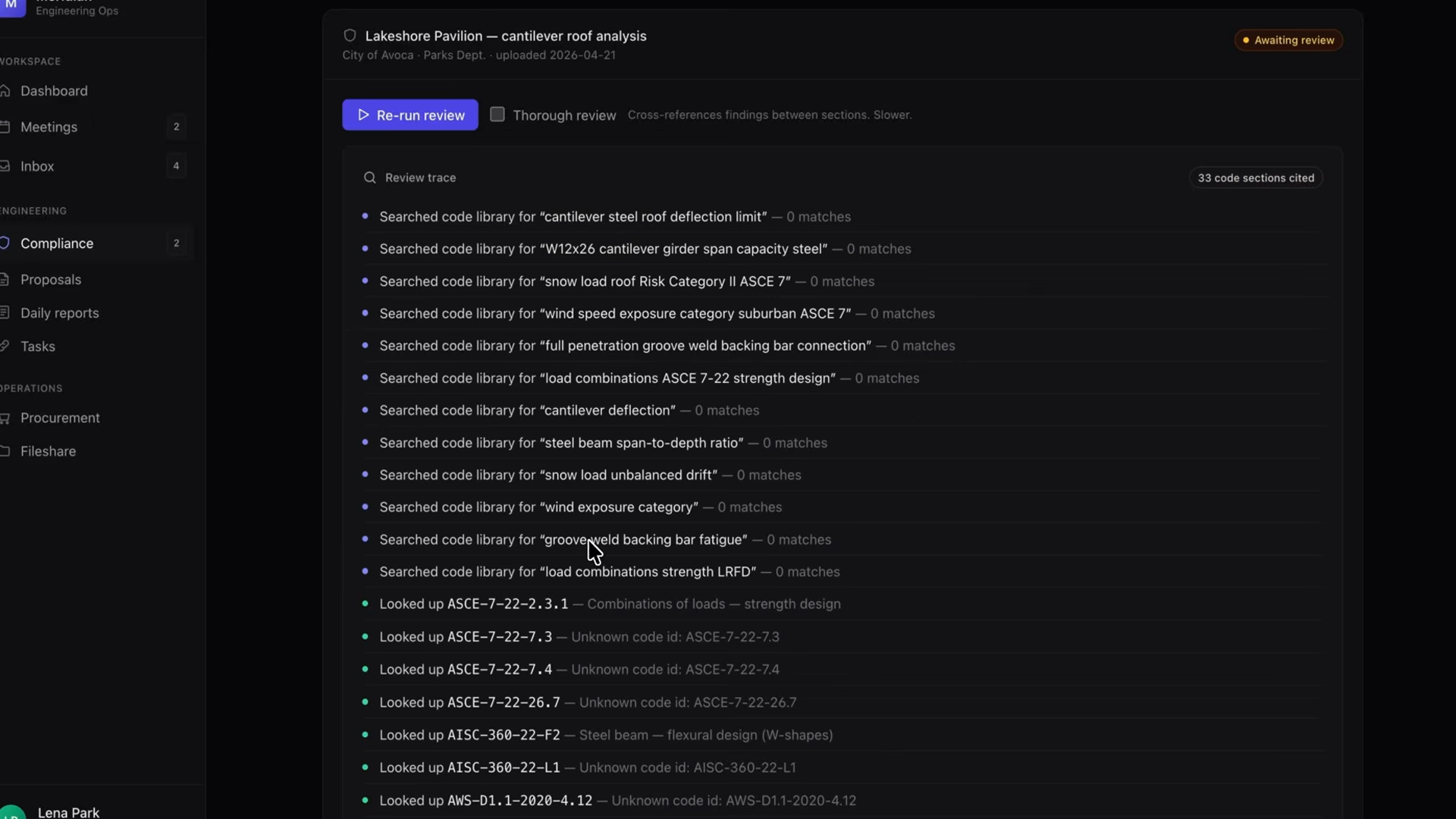
The review trace of a running compliance agent: dozens of tool calls searching the building-code library and looking up specific code sections as the loop iterates

Recap

  • An agent is Claude in a loop: observe, decide, act, repeat.
  • The loop is simple: send messages with tools, run any tool Claude requests, feed the result back, and stop when the stop reason is end_turn.
  • You own the loop and the tools. Claude owns the reasoning.
  • The same loop shape scales from a mock weather demo to a production compliance agent — only the tools and plumbing change.
  • When you don't want to own the loop, managed agents run this exact loop for you on Anthropic's infrastructure.