Anthropic Academy Courses My Profile Sign Out

Что такое использование инструментов?

Ваши существующие рабочие процессы зависят от множества различных технологий — программ для управления проектами, баз данных, файлов. Claude не может проверять эти данные самостоятельно. Вместо этого он полагается на инструменты, которые предоставляют доступ к внешним данным и действиям.

Что такое инструмент

Проще говоря, инструмент — это функция, которую вы определяете и предоставляете Claude. Вы описываете, что она делает, и какие входные данные принимает, а Claude решает, когда её вызвать.

Главное, что нужно запомнить: Claude не выполняет инструмент — это делает ваш код. Процесс выглядит так:

  • Claude запрашивает вызов инструмента.
  • Ваш код выполняет функцию.
  • Результат возвращается обратно к Claude, и он продолжает работу.

Как определяются инструменты

Инструменты — это JSON-схемы, состоящие из трёх частей: имени, описания и схемы входных данных. Вы передаёте их Claude в массиве `tools` в теле запроса.

Описание — это то, что читает Claude, чтобы решить, вызывать ли инструмент. Если вы пишете нечёткое описание, инструмент будет использоваться неправильно. Это главная причина, почему агенты дают сбои или не используют доступные инструменты. Будьте конкретны.

Вот как выглядит определение инструмента:

```json

{

"name": "lookup_building_code",

"description": "Look up a specific building code section by its identifier. Returns the full text of that code section.",

"input_schema": {

"type": "object",

"properties": {

"section": {

"type": "string",

"description": "The building code section to look up"

}

},

"required": ["section"]

}

}

```

Что происходит, когда мы используем этот инструмент? Допустим, мы отправляем агенту отчёт о соответствии нормам. На первом шаге Claude возвращает `stop_reason: "tool_use"` — это наш сигнал. Вот как выглядит ответ:

Наш цикл вызывает `lookup_building_code` с параметром, запрошенным Claude, а затем передаёт результат обратно в виде результата инструмента — пользовательского сообщения, содержащего блок `tool_result`, связанный с идентификатором вызова инструмента.

И Claude продолжает работу. В этот момент мы можем продолжать вызывать инструменты и возвращать результаты, пока у Claude не будет всей необходимой информации.

Несколько инструментов: предоставляем Claude выбор

Один инструмент полезен, но интересная часть — дать Claude возможность использовать несколько инструментов и наблюдать, как он выбирает, какой из них использовать и в каком порядке.

Представьте такой сценарий: вы собираетесь в трёхдневную поездку в Денвер и хотите узнать сегодняшнюю погоду и прогноз на ближайшие дни. Поэтому мы объявляем два инструмента вместо одного:

```typescript

const tools = [

{

name: "get_weather",

description: "Get today's current weather for a city.",

input_schema: {

type: "object",

properties: {

},

required: ["city"]

}

},

{

name: "get_forecast",

description: "Get the weather forecast for the next few days for a city.",

input_schema: {

type: "object",

properties: {

},

required: ["city"]

}

}

];

```

Цикл остаётся таким же, как и в предыдущих примерах с агентами. Единственное новое — это функция `runTool`, которая обрабатывает вызов инструмента с помощью оператора `switch`. Этот блок кода — это место, где ваш код действительно выполняется:

```typescript

function runTool(name, input) {

switch (name) {

case "get_weather":

return getWeather(input.city);

case "get_forecast":

return getForecast(input.city);

}

}

while (true) {

const response = await client.messages.create({

model: "claude-sonnet-4-6",

max_tokens: 1024,

messages,

tools,

});

if (response.stop_reason !== "tool_use") {

// Claude завершил работу — это окончательный ответ

break;

}

const toolResults = response.content

.filter((block) => block.type === "tool_use")

type: "tool_result",

tool_use_id: block.id,

content: runTool(block.name, block.input),

}));

}

```

Вот и весь шаблон. Хотите добавить третий инструмент? Добавьте его в массив, добавьте новый `case` в `switch`, и всё готово.

Запустите это, и вы увидите, как Claude вызовет `get_weather`, а затем `get_forecast` — иногда в одном шаге, иногда друг за другом. Затем он ответит: берите тёплые вещи, ожидаются снежные хлопья сегодня, к концу недели потеплеет.

Обратите внимание, как Claude сделал выбор. Он прочитал описания, сопоставил ваш запрос с "погодой сегодня" и "следующими днями", и выбрал подходящий инструмент для каждого. Вот почему описания инструментов так важны.

Средство запуска инструментов: избавляемся от шаблонного кода

Вероятно, вы уже заметили два красных флага в написанном коде:

  • Слишком много кода для двух простых запросов.
  • В реальной кодовой базе не хочется вручную писать JSON-схемы для каждой функции. Это как писать код дважды.

Вот здесь и приходит на помощь средство запуска инструментов. Оно входит в состав Claude SDK для TypeScript, Python и Ruby. Средство запуска берёт ваши реальные функции, считывает типы и документацию, чтобы самостоятельно сформировать схему, и обрабатывает весь цикл использования/результата инструмента внутри себя.

Ваш код сокращается до: опишите инструмент, отправьте запрос, дождитесь результата. Вот тот же пример с двумя инструментами для погоды, но с использованием средства запуска:

```typescript

// Те же два запроса, которые мы делали вручную — просто обычные функции TypeScript

function getWeather(city: string) {

// ...существующий запрос

}

function getForecast(city: string) {

// ...существующий запрос

}

const runner = client.beta.messages.toolRunner({

model: "claude-sonnet-4-6",

max_tokens: 1024,

messages: [

{

role: "user",

content:

"I'm packing for a three-day trip to Denver. What's the weather today and over the next few days?",

},

],

tools: [getWeather, getForecast],

});

// Возвращает окончательное сообщение ассистента после завершения всех вызовов инструментов

const finalMessage = await runner.untilDone();

```

Тот же сценарий, но с гораздо меньшим количеством кода:

  • Нет цикла `while`, нет переключателя `stop_reason`, не нужно вручную добавлять результаты инструментов в сообщения — средство запуска обрабатывает всё это.
  • Нет JSON-схем, поэтому не нужно писать одно и то же дважды.
  • Две функции — это те же запросы, которые мы делали вручную минуту назад, просто обычные функции TypeScript.
  • `runner.untilDone()` возвращает окончательное сообщение ассистента, когда всё завершено.

Запустите это, и вы получите тот же ответ.

Реальные инструменты оборачивают ваш существующий код

В реальной жизни ваши инструменты не будут содержать жёстко закодированные данные о погоде. Они будут оборачивать реальные функции, которые уже есть в вашем приложении.

Возьмём агента для проверки соответствия нормам: его инструменты — это тонкие обёртки вокруг функций `lookup_building_code` и `search_building_code`, которые уже существуют в кодовой базе. С помощью средства запуска инструментов вы передаёте эти функции напрямую, и агент ссылается на конкретные разделы кода в каждом выводе, который он составляет — без необходимости писать схемы.

Итоги

  • Инструменты предоставляют Claude доступ к вашим системам. Инструмент — это функция, которую вы определяете и предоставляете; Claude решает, когда её вызвать, а ваш код выполняет её.
  • Инструменты — это JSON-схемы с именем, описанием и схемой входных данных, передаваемые в запросе в виде массива `tools`.
  • Пишите конкретные описания. Нечёткие описания — главная причина, почему агенты дают сбои.
  • `stop_reason: "tool_use"` — это ваш сигнал для выполнения инструмента и возврата результата в виде блока `tool_result`.
  • Для нескольких инструментов используйте диспетчеризацию по имени инструмента. Добавление инструмента означает добавление в массив и добавление нового `case`.
  • Средство запуска инструментов в SDK (TypeScript, Python, Ruby) формирует схемы на основе ваших реальных функций и обрабатывает весь цикл — или вы можете запустить цикл самостоятельно.
  • Вы выполняете код или делегируете цикл. На дальнем конце этого спектра управляемые агенты полностью делегируют работу Anthropic.

Your existing workflows rely on a lot of different technologies — project management software, databases, files. Claude can't just check these things itself. Instead, it relies on tools, which give Claude access to external data and actions.

What a tool is

Simply put, a tool is a function you define and expose to Claude. You describe what it does and what inputs it takes, and Claude decides when to call it.

Here's the key thing to internalize: Claude doesn't execute the tool — your code does. The flow looks like this:

  1. Claude requests a tool call.
  2. Your code executes the function.
  3. The result goes back to Claude, and it keeps going.

How tools are defined

Tools are JSON schemas with three parts: a name, a description, and an input schema. You pass them to Claude in the request body as a tools array.

The description is what Claude reads to decide whether to call the tool. If you write a vague description, you get bad tool use. This is the number one reason agents misfire or don't grab the tools that are available to them. Be specific.

Here's what a tool definition looks like:

{
  "name": "lookup_building_code",
  "description": "Look up a specific building code section by its identifier. Returns the full text of that code section.",
  "input_schema": {
    "type": "object",
    "properties": {
      "section": {
        "type": "string",
        "description": "The building code section to look up"
      }
    },
    "required": ["section"]
  }
}

So what happens when we use this? Say we send an agent a compliance report. On the first turn, Claude comes back with stop_reason: "tool_use" — that's our signal. Here's what that response looks like:
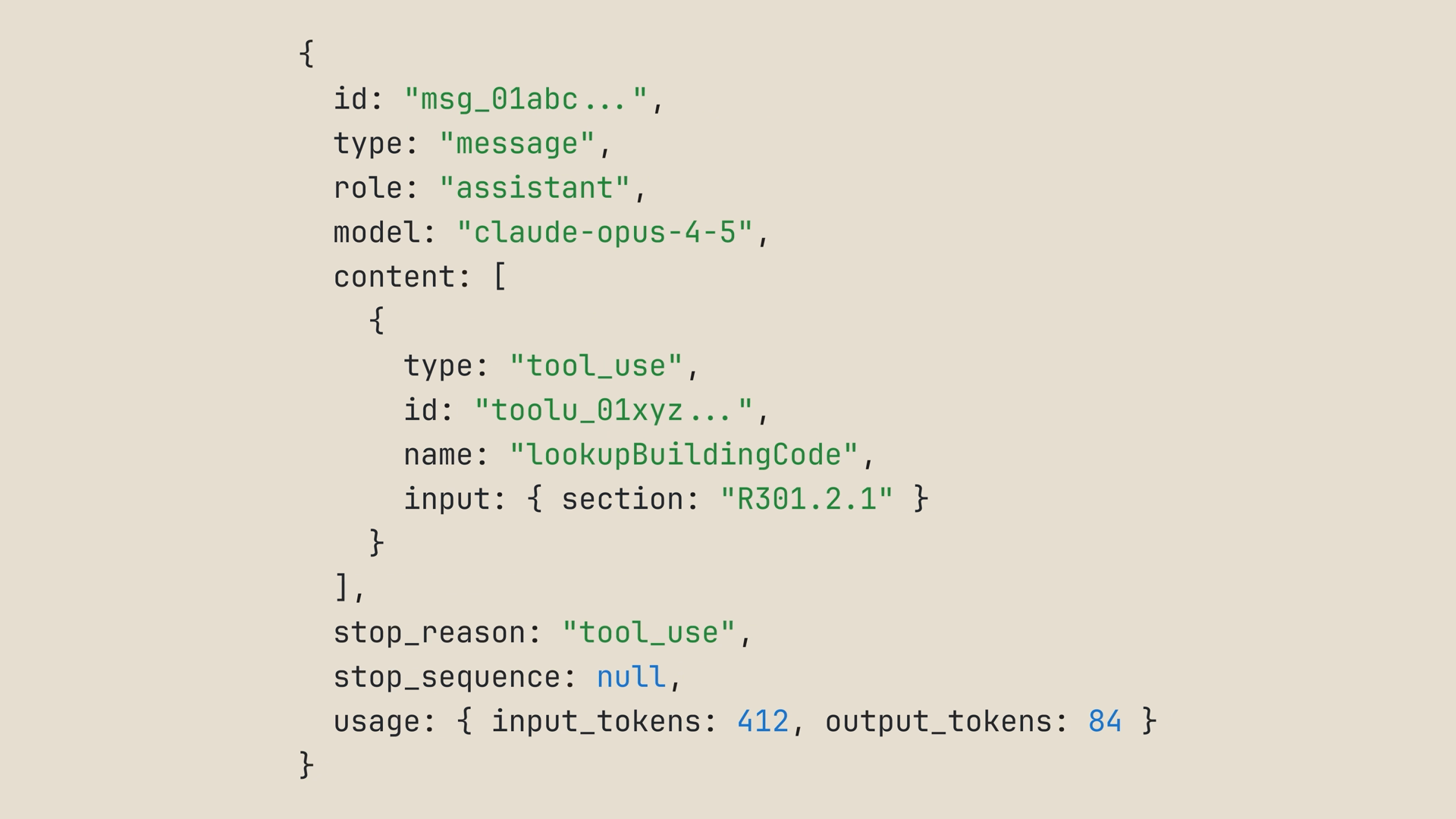
An API response with stop_reason set to tool_use, containing a tool_use content block that names the tool and the input Claude wants to call it with

Our loop calls lookup_building_code with the parameter Claude requested, then feeds the result back as a tool result — a user message containing a tool_result block tied to the tool call's id:
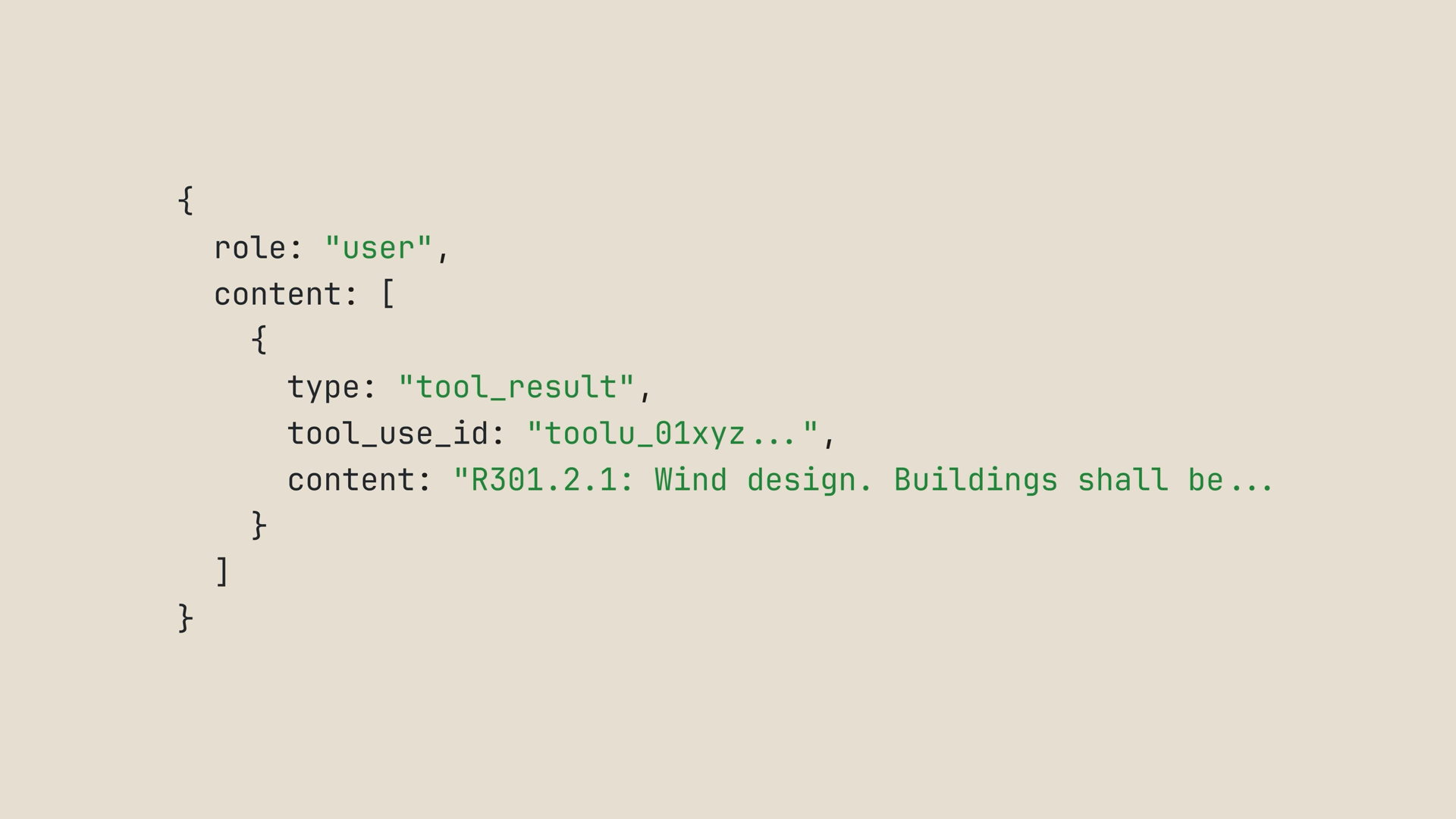
A user message containing a tool_result block with the tool_use_id and the looked-up building code text as its content

And Claude keeps going. At that point, we can keep calling tools and returning results to Claude until it has what it needs.

Multiple tools: letting Claude pick

One tool is useful, but the interesting part is giving Claude multiple tools and watching it pick which one to use, in what order.

Picture this scenario: you're packing for a three-day trip to Denver, and you want both today's weather and the forecast for the next few days. So we declare two tools instead of one:

const tools = [
  {
    name: "get_weather",
    description: "Get today's current weather for a city.",
    input_schema: {
      type: "object",
      properties: {
        city: { type: "string", description: "The city to check" }
      },
      required: ["city"]
    }
  },
  {
    name: "get_forecast",
    description: "Get the weather forecast for the next few days for a city.",
    input_schema: {
      type: "object",
      properties: {
        city: { type: "string", description: "The city to check" }
      },
      required: ["city"]
    }
  }
];

The loop is identical to the agent loops we've already seen. The only new piece is a runTool function that dispatches on the tool name with a switch statement — this block of code is just where your code actually runs:

function runTool(name, input) {
  switch (name) {
    case "get_weather":
      return getWeather(input.city);
    case "get_forecast":
      return getForecast(input.city);
  }
}

while (true) {
  const response = await client.messages.create({
    model: "claude-sonnet-4-6",
    max_tokens: 1024,
    messages,
    tools,
  });

  if (response.stop_reason !== "tool_use") {
    // Claude is done — this is the final answer
    break;
  }

  messages.push({ role: "assistant", content: response.content });

  const toolResults = response.content
    .filter((block) => block.type === "tool_use")
    .map((block) => ({
      type: "tool_result",
      tool_use_id: block.id,
      content: runTool(block.name, block.input),
    }));

  messages.push({ role: "user", content: toolResults });
}

And that's the whole pattern. Want a third tool? Add it to the array, add a case to the switch, and you're done.

Run this, and you'll see Claude call get_weather and then get_forecast — sometimes in the same turn, sometimes one after the other. Then it answers: pack layers, expect snow flurries today, warming through the week.

Now notice how Claude chose. It read the descriptions, mapped your prompt to "today's weather" and "the next few days," and picked the right tool for each. That's why your tool descriptions really matter.

The tool runner: skip the boilerplate

You've probably already spotted two red flags with what we just wrote:

  • That's a lot of code for two simple lookups.
  • In a real codebase, you don't want to handwrite JSON schemas for every function you have. It's like writing your code twice.

That's where the tool runner comes in. It ships in the Claude SDK for TypeScript, Python, and Ruby. The runner takes your actual functions, reads the types and docs to build the schema for you, and handles the entire tool use / tool result loop internally.

Your code shrinks down to: describe the tool, send the prompt, wait for the result. Here's the same two-tool weather demo wired through the tool runner:

// The same two lookups we ran by hand — just plain TypeScript functions
function getWeather(city: string) {
  // ...existing lookup
}

function getForecast(city: string) {
  // ...existing lookup
}

const runner = client.beta.messages.toolRunner({
  model: "claude-sonnet-4-6",
  max_tokens: 1024,
  messages: [
    {
      role: "user",
      content:
        "I'm packing for a three-day trip to Denver. What's the weather today and over the next few days?",
    },
  ],
  tools: [getWeather, getForecast],
});

// Returns the final assistant message after all the tool ping-pong has settled
const finalMessage = await runner.untilDone();

Same scenario, a fraction of the code:

  • No while loop, no stop reason switch, no manually pushing tool results back into messages — the runner handles all of that.
  • No JSON schemas, so you don't write things twice.
  • The two functions are the same lookups we ran by hand a minute ago, just plain TypeScript.
  • runner.untilDone() returns the final assistant message once everything has settled.

Run it, and you get the same answer.

Real tools wrap your existing code

In real life, your tools wouldn't be hardcoded weather data. They'd wrap actual functions you already have in your application.

Take a compliance review agent: its tools are thin wrappers around lookup_building_code and search_building_code functions that already exist in the codebase. With the tool runner, you pass those functions in directly, and the agent cites specific code sections in every finding it writes — no schema writing required:
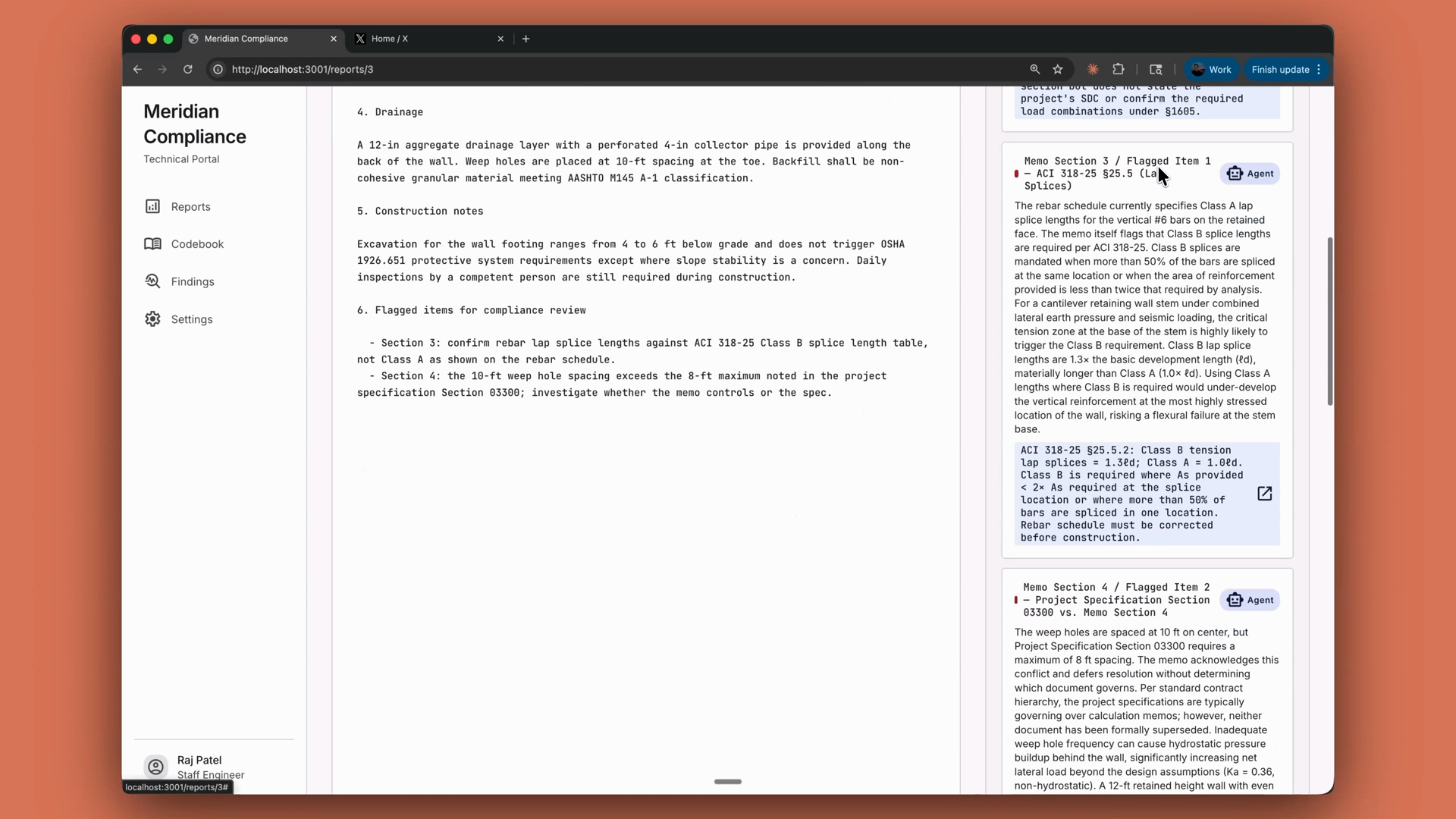
A compliance review app showing a structural report alongside agent findings, each flagged item citing the specific building code section it checked

Recap

  • Tools give Claude access to your systems. A tool is a function you define and expose; Claude decides when to call it, and your code executes it.
  • Tools are JSON schemas with a name, a description, and an input schema, passed in the request as a tools array.
  • Write specific descriptions. Vague descriptions are the number one reason agents misfire.
  • stop_reason: "tool_use" is your signal to run the tool and feed the result back as a tool result.
  • For multiple tools, dispatch on the tool name. Adding a tool means adding to the array and adding a case.
  • The SDK's tool runner (TypeScript, Python, Ruby) builds schemas from your actual functions and handles the whole loop — or you can run the loop yourself.
  • You execute, or you delegate the loop. At the far end of that spectrum, managed agents delegate the whole agent to Anthropic.