Anthropic Academy Courses My Profile Sign Out

Навыки

Навыки — это папки с инструкциями, скриптами и ресурсами, которые Claude загружает динамически для улучшения производительности в специализированных задачах. В основе каждого навыка лежит файл SKILL.md — упакованный набор инструкций, который вы загружаете один раз и затем прикрепляете к любому вызову `messages.create`. Вы обучаете Claude, как выполнять ту или иную задачу: формат отчёта о статусе, чек-лист для ревью, примечания к релизу. Claude читает навык, следует процедуре и формирует вывод в заданном вами формате.

Навыки и инструменты

Важно понимать разницу между ними, так как они решают разные задачи:

  • Инструменты подключают Claude к данным и действиям. *«Посмотри этот раздел кода»*, *«отправь это письмо»* — Claude вызывает инструмент, а что-то другое выполняет действие.
  • Навыки обучают Claude процедуре. *«Сгенерируй ежедневный отчёт о статусе по этому шаблону»* — это инструкция, которую Claude читает и выполняет, иногда запуская встроенные скрипты самостоятельно.

Простое правило для запоминания: инструменты — о том, что может сделать Claude, а навыки — о том, как вы хотите, чтобы это было сделано.

Ещё один важный момент: навыки не полностью загружаются в контекст при запуске. Сначала загружаются только название и описание. Когда агент решает, что навык актуален, он загружает его полностью в контекст. Это позволяет держать контекст компактным, даже если доступно множество навыков.

Загрузка навыка

Навыки загружаются один раз в ваше рабочее пространство и затем ссылаются по идентификатору. Вы можете загрузить их напрямую на платформе Claude, либо программно:

```python

skill = client.beta.skills.create(

display_title="Status Report Generator",

files=files_from_dir("status-report-skill"), # папка с SKILL.md

)

print(skill.id) # используйте этот ID в будущих запросах

```

В этом примере мне нужен генератор отчётов о статусе. Все правила, определяющие, что делает хороший отчёт — разделы, тон, как суммировать информацию, как обрабатывать блокирующие факторы — хранятся в навыке, упакованном заранее. Сам журнал активности — это просто строка, передаваемая во время запроса.

Прикрепление навыка к запросу

Навыки прикрепляются к запросу через конфигурацию контейнера — массив `skills` внутри контейнера, где каждый элемент содержит `skill_id` и версию. Вот полный вызов для генератора отчётов о статусе:

```python

response = client.beta.messages.create(

model="claude-sonnet-4-5",

max_tokens=4096,

betas=["skills-2025-10-02", "code-execution-2025-08-25"],

container={

"skills": [

{

"type": "custom",

"skill_id": skill.id,

"version": "latest",

}

]

},

tools=[

{

"type": "code_execution_20250825",

"name": "code_execution",

}

],

messages=[

{

"role": "user",

}

],

)

```

На что стоит обратить внимание:

  • Мы вызываем `client.beta.messages.create`, а не стандартный метод, и передаём функцию навыков через бета-заголовок. На момент создания этого материала навыки всё ещё находятся в статусе бета-версии.
  • `container.skills` — это место, где прикрепляется навык. Это список, поэтому вы можете подключить несколько навыков к одному вызову.
  • Здесь также включено выполнение кода. Навыки часто хорошо сочетаются с выполнением кода, так как процедуры навыков могут выполнять реальную работу — например, запускать скрипты в терминале.

Запуск

Вывод — это отчёт о статусе, отформатированный точно так, как указано в навыке. Разделы, тон, обработка блокирующих факторов — всё это берётся из файла SKILL.md, который вы загрузили. Пользовательский запрос состоит из одной строки; сама процедура хранится в навыке.

В производственном приложении так команды стандартизируют вывод по всему функционалу. С помощью этого конечного обработчика отчётов о статусе каждый менеджер продукта получает одинаковую структуру, тон, разделы и порядок — без необходимости копировать шаблон в промпт.

Итоги

  • Навыки упаковывают ваши процедуры. Файл SKILL.md (плюс любые скрипты и ресурсы) обучает Claude, как нужно выполнять ту или иную задачу.
  • Инструменты vs. Навыки: инструменты — о том, что может сделать Claude; навыки — о том, как вы хотите, чтобы это было сделано.
  • Навыки загружаются постепенно. При запуске загружаются только название и описание; полный навык загружается в контекст, когда агент решает его использовать.
  • Загрузите один раз с помощью `client.beta.skills.create`, затем прикрепите через `container.skills` в любом вызове `messages.create` — это список, поэтому вы можете подключить несколько навыков.
  • Сочетайте с выполнением кода, когда процедура навыка должна выполнять реальную работу.
  • Используйте навык, когда важно не только что сделать, но и как.

Навыки are folders of instructions, scripts, and resources that Claude loads dynamically to improve performance on specialized tasks. At the core of every Skill is a SKILL.md file — a packaged set of instructions you upload once and then attach to any messages.create call. You're teaching Claude how you do something: your status report format, your review checklist, your release notes. Claude reads the Skill, follows the procedure, and produces output in your shape.

Skills vs. tools

It's worth being clear on the difference, because the two solve different problems:

  • Tools connect Claude to data and actions. "Look up this code section," "send this email" — Claude calls the tool, and something else runs.
  • Навыки teach Claude a procedure. "Generate the daily status report following this template" — it's a playbook Claude reads and follows, which sometimes means running bundled scripts itself.

A simple way to remember it: tools are about what Claude can do, while Skills are about how you want it done.
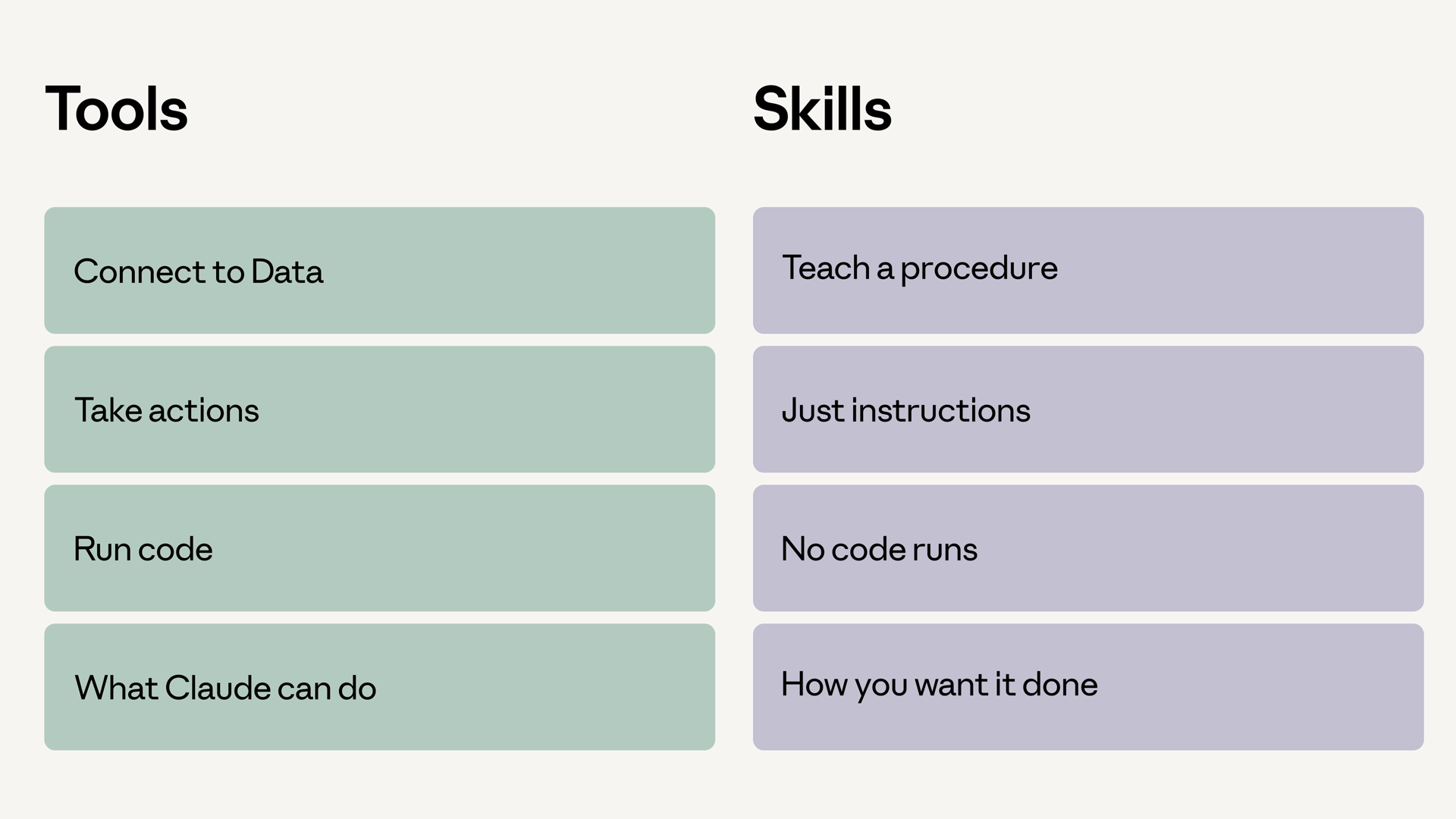
Side-by-side comparison of tools and Skills: tools connect to data, take actions, and run code — what Claude can do; Skills teach a procedure with just instructions, no code runs — how you want it done

One more thing worth knowing: Skills don't load fully into context on startup. Only the name and description load at first. When your agent decides a Skill is relevant, it then loads the full Skill into context. That keeps your context lean even when many Skills are available.

Uploading a Skill

Skills are uploaded once to your workspace, then referenced by ID. You can upload directly on the Claude Platform, or do it programmatically:

skill = client.beta.skills.create(
    display_title="Status Report Generator",
    files=files_from_dir("status-report-skill"),  # folder containing SKILL.md
)

print(skill.id)  # reference this ID in future requests

For this example, I want a status report generator. All the rules for what makes a good status report — sections, tone, how to summarize, how to handle blockers — live in a Skill packaged ahead of time. The activity log itself is just a string passed in at request time.

Attaching a Skill to a request

Skills attach to a request through the container configuration — a skills array inside the container, where each entry names a skill_id and version. Here's the full call for the status report generator:

response = client.beta.messages.create(
    model="claude-sonnet-4-5",
    max_tokens=4096,
    betas=["skills-2025-10-02", "code-execution-2025-08-25"],
    container={
        "skills": [
            {
                "type": "custom",
                "skill_id": skill.id,
                "version": "latest",
            }
        ]
    },
    tools=[
        {
            "type": "code_execution_20250825",
            "name": "code_execution",
        }
    ],
    messages=[
        {
            "role": "user",
            "content": f"Generate the daily status report from this activity log:\n\n{activity_log}",
        }
    ],
)

A few things worth pointing out:

  • We're calling client.beta.messages.create, not the standard one, and passing the skills feature via the beta header. As of this video, Skills are still a beta feature.
  • container.skills is where the Skill attaches. It's a list, so you can layer multiple Skills onto one call.
  • Code execution is turned on here too. Skills often pair well with code execution, because Skill procedures can do real work — like running scripts in a terminal.

Running it

The output is a status report formatted exactly the way the Skill says to format it. Sections, tone, blocker handling — all of it comes from the SKILL.md file you uploaded. The user prompt is one line; the procedure lives in the Skill.
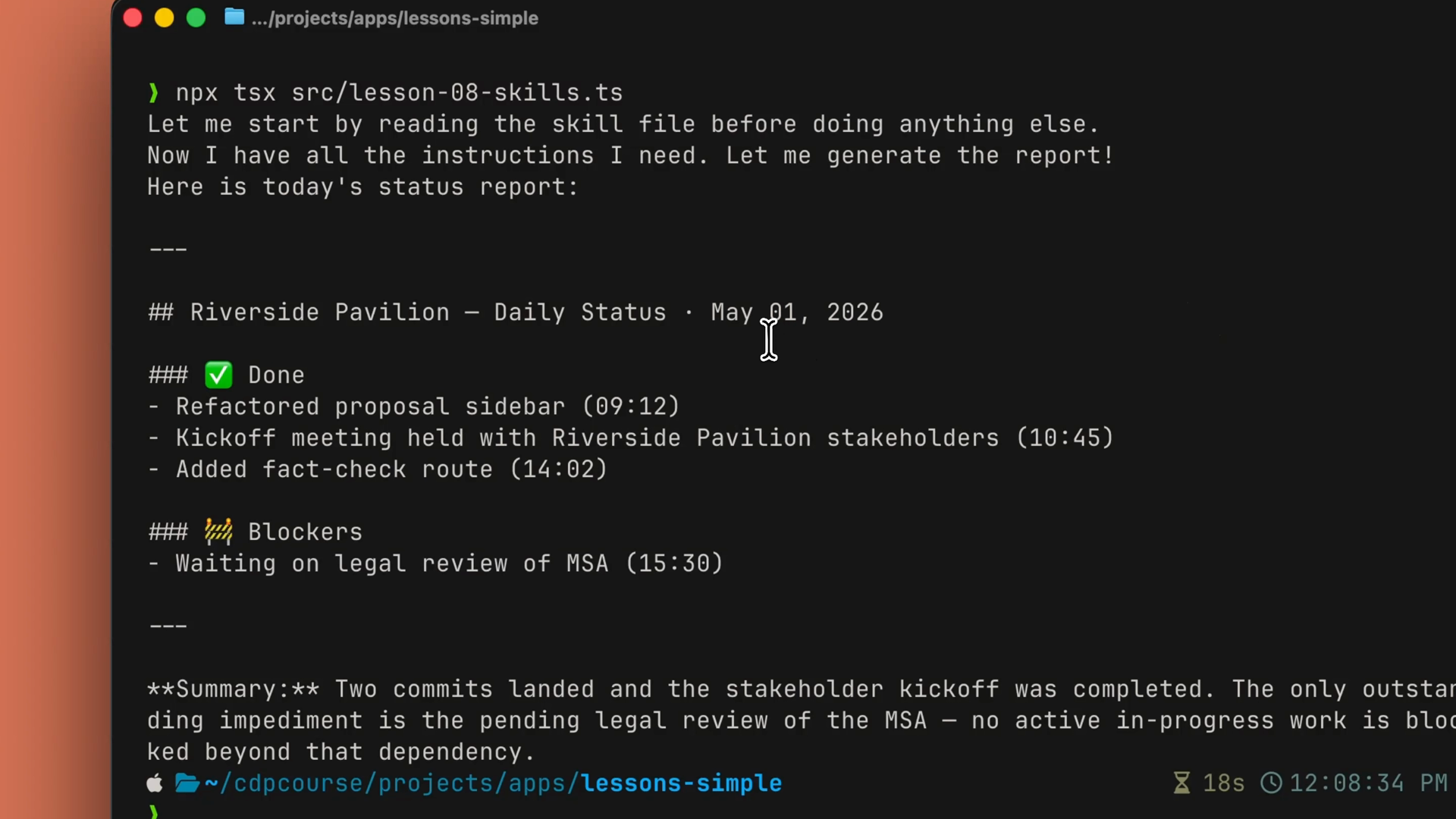
Terminal output of the generated daily status report, with Done and Blockers sections and a summary formatted by the Skill

In a production app, this is how a team standardizes output across an entire feature. With this daily status report endpoint, every PM gets the same structure, the same tone, the same sections, in the same order — without anyone copy-pasting a template into a prompt.
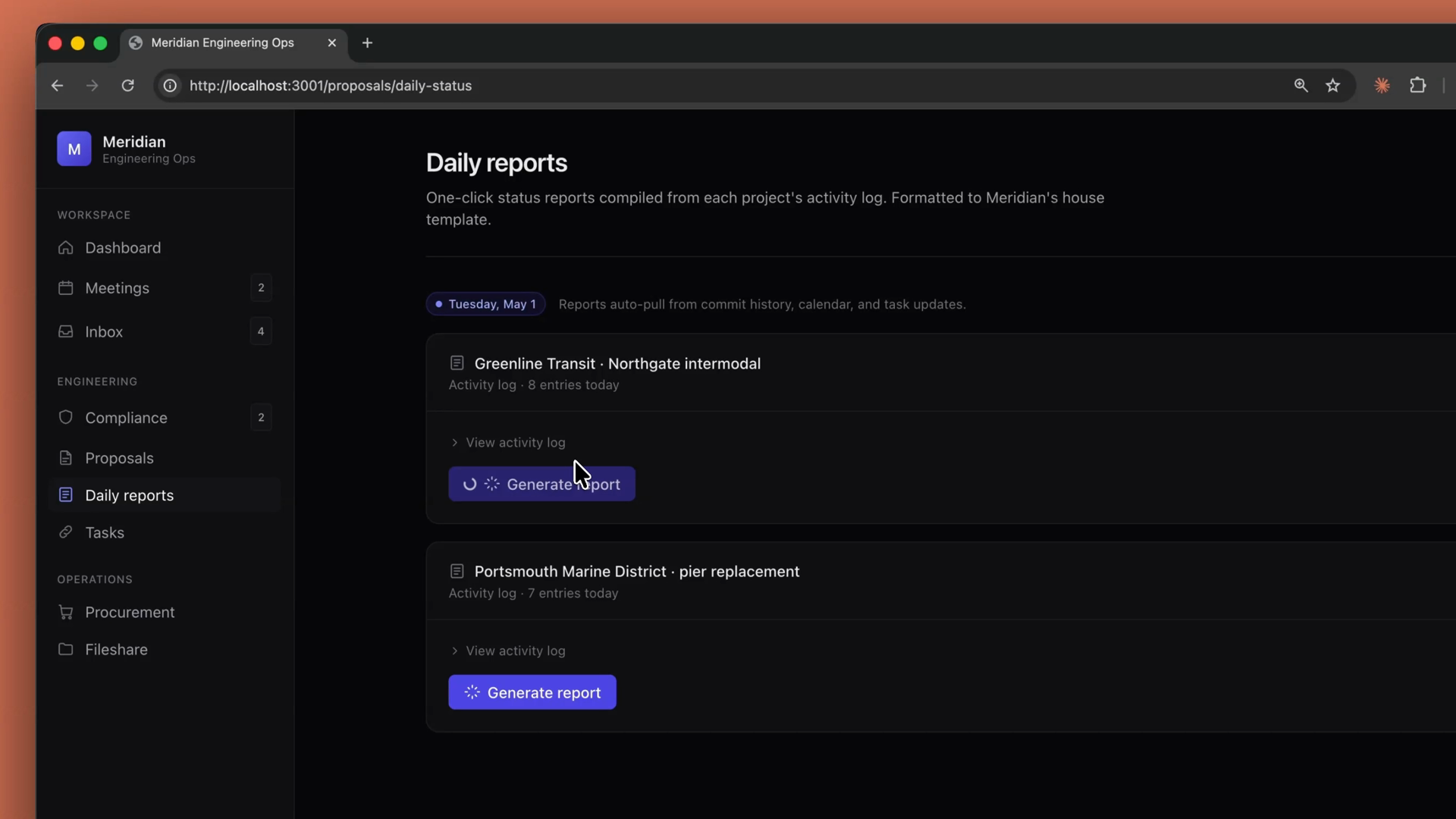
A project management app with a Daily reports page, where each project's activity log has a one-click Generate report button backed by the Skill

Recap

  • Skills package your procedures. A SKILL.md file (plus any scripts and resources) teaches Claude how you want something done.
  • Tools vs. Skills: tools are about what Claude can do; Skills are about how you want it done.
  • Skills load progressively. Only the name and description load at startup; the full Skill loads into context when the agent decides to use it.
  • Upload once with client.beta.skills.create, then attach with container.skills on any messages.create call — a list, so you can layer multiple Skills.
  • Pair with code execution when the Skill's procedure needs to do real work.
  • Reach for a Skill when the how matters as much as the what.