Anthropic Academy Courses My Profile Sign Out

Встроенные инструменты

Вы можете создавать собственные пользовательские инструменты, но некоторые функции настолько распространены, что Anthropic поставляет их заранее настроенными. Вам не нужно писать код. Вам не нужно размещать песочницу. Вы просто объявляете инструмент, а Anthropic выполняет его.

Серверные инструменты: объявляются вами, выполняются Anthropic

Anthropic предоставляет серверные инструменты, которые работают на их инфраструктуре. Вы их не выполняете — это делает Anthropic. Это означает, что вам не нужен цикл агента для этих вызовов. Claude сам вызывает инструменты, а результат возвращается в том же ответе.

Основные из них:

  • Поиск в интернете — выполняет поиск в интернете и возвращает результаты с цитатами
  • Исполнение кода — пишет и выполняет Python в песочнице
  • Получение веб-контента — извлекает полный контент по URL

Два серверных инструмента в одном файле

Давайте рассмотрим основные из них в одном файле: два вызова `messages.create`, один с поиском в интернете, а другой с исполнением кода.

```python

import anthropic

client = anthropic.Anthropic()

Вызов 1: поиск в интернете — Anthropic выполняет поиск на сервере

search_response = client.messages.create(

model="claude-opus-4-8",

max_tokens=1024,

messages=[

],

)

for block in search_response.content:

if block.type == "server_tool_use":

elif block.type == "text":

print(block.text)

Вызов 2: исполнение кода — Claude пишет и выполняет Python в песочнице

code_response = client.messages.create(

model="claude-opus-4-8",

max_tokens=1024,

messages=[

],

)

for block in code_response.content:

if block.type == "server_tool_use":

elif block.type == "bash_code_execution_tool_result":

elif block.type == "text":

print(block.text)

```

На что стоит обратить внимание:

  • Здесь нет цикла агента. Мы не переключаемся на `stop_reason`. Мы не возвращаем результаты инструментов обратно. Anthropic выполняет инструмент на сервере, и ответ уже содержит результат.
  • В ответе есть новые типы блоков. Блок `server_tool_use` для вызова инструмента, блок с результатом исполнения кода для вывода, а также обычные текстовые блоки.

Запуск

Для поиска в интернете вы увидите вызов инструмента Claude, затем одно предложение с ответом о последнем релизе модели с встроенными цитатами из поиска.

Для исполнения кода вы увидите сам Python-код, который написал Claude, вывод stdout из песочницы, где он выполнялся, и окончательный текстовый ответ.

Нам не пришлось разворачивать поисковый краулер. Мы не запускали песочницу Python. Мы объявили два инструмента и получили их бесплатно.

Другая категория: клиентские инструменты

Стоит знать, что существует и другая категория. Клиентские инструменты выполняются там, где работает ваш код. Они входят в состав Claude SDK, поэтому вам не нужно определять схему самостоятельно. Два примера:

  • Память — Claude читает и записывает память между сессиями
  • Bash — постоянная оболочка bash, чтобы Claude мог выполнять команды

Они имеют ту же структуру, что и пользовательский инструмент, но SDK предоставляет вам схему и разумный обработчик.

Почему это важно в продакшене

В производственном приложении это самый короткий путь к функциям, на реализацию которых в противном случае ушли бы недели. Поиск в интернете может питать конечную точку для проверки фактов, которая проверяет каждое числовое и нормативное утверждение в черновике на соответствие актуальным данным в интернете.

Одно напоминание: даже если что-то подтверждено в интернете, это не значит, что это правда. Всегда перепроверяйте работу Claude.

Итоги

  • Серверные инструменты — поиск в интернете, исполнение кода, получение веб-контента — объявляются в вашем массиве инструментов. Их выполняет Anthropic.
  • Вы получаете результат в том же ответе, без необходимости в цикле агента. Ищите блоки `server_tool_use` и результаты инструментов вместе с обычными текстовыми блоками.
  • Клиентские инструменты, такие как память и bash, выполняются там, где работает ваш код, но SDK предоставляет вам схему и обработчик.
  • Идея «размещено Anthropic» масштабируется до конца: управляемые агенты применяют её ко всему агенту, а не только к одному инструменту.

You can build your own custom tools, but some capabilities are common enough that Anthropic ships them pre-built. You don't write the code. You don't host the sandbox. You just declare the tool, and Anthropic runs it.

Server tools: declared by you, run by Anthropic

Anthropic provides server tools that run on their infrastructure. You don't execute these — Anthropic does. That means you don't need an agent loop for these calls. Claude calls the tools on its own, and the result comes back inside the same response.

The main ones are:

  • Web search — searches the internet and returns results with citations
  • Code execution — writes and runs Python in a sandbox
  • Web fetch — retrieves full content from URLs

Two server tools in one file

Let's check out some of the big ones in one file: two messages.create calls, one with web search and one with code execution.

import anthropic

client = anthropic.Anthropic()

# Call 1: web search — Anthropic runs the search server-side
search_response = client.messages.create(
    model="claude-opus-4-8",
    max_tokens=1024,
    tools=[{"type": "web_search_20260209", "name": "web_search"}],
    messages=[
        {"role": "user", "content": "What is Anthropic's latest model release? Answer in one sentence."}
    ],
)

for block in search_response.content:
    if block.type == "server_tool_use":
        print(f"Tool call: {block.name} — {block.input}")
    elif block.type == "text":
        print(block.text)

# Call 2: code execution — Claude writes and runs Python in a sandbox
code_response = client.messages.create(
    model="claude-opus-4-8",
    max_tokens=1024,
    tools=[{"type": "code_execution_20260120", "name": "code_execution"}],
    messages=[
        {"role": "user", "content": "Calculate the mean and standard deviation of [1, 2, 3, 4, 5, 6, 7, 8, 9, 10]"}
    ],
)

for block in code_response.content:
    if block.type == "server_tool_use":
        print(f"Tool call: {block.name} — {block.input}")
    elif block.type == "bash_code_execution_tool_result":
        print(f"stdout: {block.content.stdout}")
    elif block.type == "text":
        print(block.text)

Two things to notice:

  1. There's no agent loop here. We don't switch on stop_reason. We don't push tool results back. Anthropic runs the tool server-side, and the response already contains the result.
  2. The response has new block types. A server_tool_use block for the tool call, a code execution tool result block for the output, plus the regular text blocks.

Running it

For web search, you'll see Claude's tool call printed, then a one-sentence answer about the latest model release with the search citations folded in.

For code execution, you'll see the actual Python Claude wrote, the stdout from the sandbox running it, and a final text answer.

We didn't have to spin up a search crawler. We didn't run a Python sandbox. We declared two tools and got both for free.

The other category: client tools

Worth knowing the other category exists. Client tools run where your code runs. They're shipped in the Claude SDK, so you don't have to define the schema yourself. Two examples:

  • Memory — Claude reads and writes memory across sessions
  • Bash — a persistent bash shell so Claude can execute commands
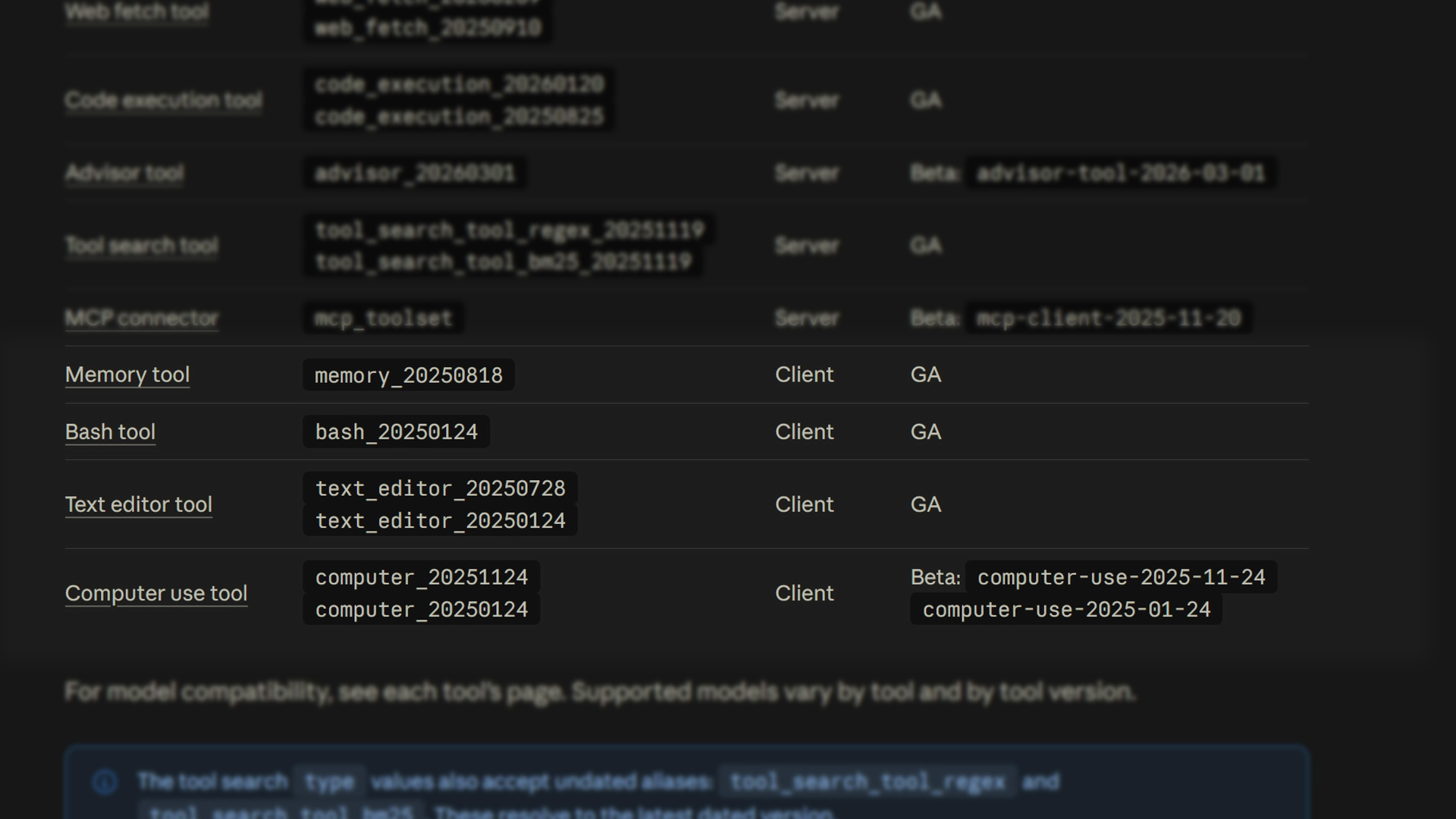
The Anthropic docs table of built-in tools, with memory and bash listed as client tools alongside server tools like web fetch and code execution

They have the same shape as a custom tool, but the SDK gives you the schema and a sensible runner.

Why this matters in production

In a production app, this is the shortest path to features that would otherwise take weeks. Web search can power a fact-check endpoint that verifies every numeric and regulatory claim in a draft against the live web.
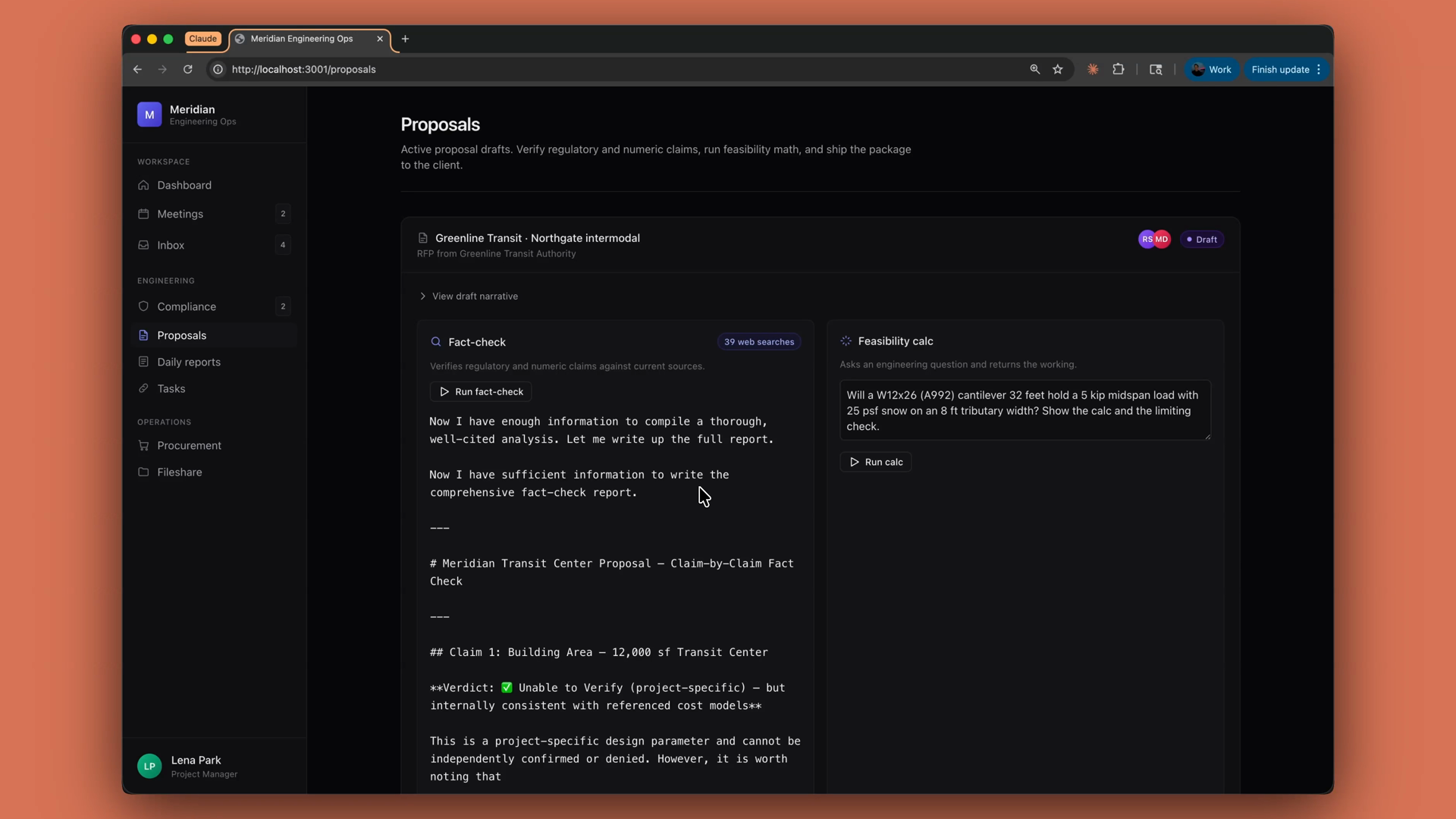
A proposal review app using web search to fact-check the regulatory and numeric claims in a draft proposal

One reminder, though: just because something is validated on the internet doesn't mean it's true. Always double-check Claude's work.

Recap

  • Server tools — web search, code execution, web fetch — are declared in your tools array. Anthropic runs them.
  • You get the result in the same response, with no agent loop required. Look for server_tool_use and tool result blocks alongside the regular text blocks.
  • Client tools like memory and bash run where your code runs, but the SDK ships the schema and a runner for you.
  • The "hosted by Anthropic" idea scales all the way up: managed agents apply it to the entire agent, not just one tool.